Shipping Administer Enhancements
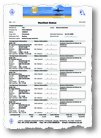 Recent enhancement to the Shipping Administer module of Move Administer consists of the Manifest Status sheet and Shipments Diary.
The Manifest Status can be printed from the manifest browse, which has also undergone some cosmentic changes of late in that it now shows all consignments allocated to each manifest as you scroll up and down the browse, and also allows you to update all, assign, open and unassign consignments to the highlighted manifest, aswell as setting the master consignment.
The Shipment Diary shows estimated and actual port departures for manifests and consignments, together with estimated and actual port arrivals, showing a total of 8 browses across 2 tabs. The consignment browses show unmanifested consignments by default, however checking a small checkbox allows all consignments to be shown. Various sorting, printing, arranging and outputting of data can be achieved using our standard Xplore feature, available on all browses. The Shipment Diary can also automatically update on a preset number of seconds.
Another change made recently is the daily facility to automatically assign consignments to available manifests, a mundane task that took quite some time in the past, now done in the blink of an eye!

Survey Administer Version 1340 Released
 Survey Administer version 0.0.0.1340 is officially released today.
History of Changes (1336 to 1340)
FIX: Items with a destination of Not To Move are no longer included in sub and grand totals of quantity, volume or valuation on the Inventory Report, unless the Inventory Report is specifically listing items with a destination of Not To Move
ADDITION: A new ‘TLS authentication’ checkbox has been added to the Email tab of the System Defaults Wizard (Tools -> System Defaults) and when checked allows for TLS (Transport Layer Security) connections and authentication when sending emails, ideal when using GoogleMail email accounts
TABLES: SurveyDefaults