Move Administer Version 1025 Released
 Move Administer version 0.0.0.1025 is officially released today.
History of Changes (1001 to 1025)
Move Administer
Quotations
ADDITION: Mass Reject Quotations has been added to the Actions menu of each of the Query Quotation Browses, which enables mass rejection of unaccepted quotations
ADDITION: Identity labels can be print 8, 10 or 14 labels per page, depending on the option selected in the System Defaults, together with a barcode!
Storage
CHANGE: Internal changes have been made to the Storage Invoice Run section, which has shown a significant speed increase on networked systems
FIX: When invoicing the next period of a storage job or changing the invoicing frequency of a storage job, the correct email template is used if the storage job is set to email the invoice
Accounts
CHANGE: The Customer ID can form part of the invoice/credit body when producing corporate customer invoices/credits
Correspondence
ADDITION: Many new mail merge tokens have been added due to recent updates.
FIX: When previewing letters, the first page of a multi page letter now previews correctly
Reports
ADDITION: Creator Conversion Statistics report (Reports -> Removals -> Creator Conversion Statistics) has been added to the removals section of the reports menu that shows the conversion statistics based on creator
ADDITION: Creator/Category Conversion Statistics report (Reports -> Removals -> Creator/Category Conversion Statistics) has been added to the removals section of the reports menu that shows the conversion statistics based on creator but then split into categories
ADDITION: Weekly Rates report (Reports -> Storage -> Weekly Rates) has been added to the storage section of the reports menu that shows your current weekly rates
ADDITION: Various new security privileges have been added due to the new reports in this and previous updates
Options
ADDITION: On the General tab of the Accounting Defaults Wizard (Tools -> Options -> Defaults -> Accounting) you now have the option to print the Customer ID on corporate customer invoices/details
ADDITION: A new Identity Labels tab has been added to the System Defaults Wizard (Tools -> Options -> Defaults -> System) that allows you to select one of three Avery label templates, the type of barcode symbology to print and whether to use the Customer ID as the unique identifier on the barcode
ADDITION: On the Company tab of the Trading Company Wizard (Tools -> Options -> Defaults -> Trading Companies) you now have the option of supplying a Label ID which is used when printing unique barcode on the identity labels
FIX: Print Sales Text Options (Tools -> Options -> Accounting -> Sales Text -> Actions) on the Sales Text Browse now works correctly
Technical
DATA TABLE CHANGES: AccountingDefaults, Storage, SystemDefaults, Trader
CHANGE: Compiled using version 6.3.9058 of Clarion
Additional Modules
Self Storage Administer
NOTE: Many additions and changes as this module is coming to the end of it’s development
Shipping Administer
ADDITION: Destination Country Conversion Statistics report (Reports -> Removals -> Destination Country Conversion Statistics) has been added to the removals section of the reports menu that shows the conversion statistics based on the country of destination
ADDITION: A new Request tab now exists on the Consignment Wizard, but only when the consignment is classes as an import
ADDITION: An Import Manifest can be printed from the Actions menu of the Manifest Browse
ADDITION: A Container Turnout Sheet can be printed from the Actions menu of the Manifest Browse
ADDITION: A Request To Bond Form can be printed from the Actions menu of the Consignment Browse and Query International Consignments Browse
ADDITION: A Request To Clear Form can be printed from the Actions menu of the Consignment Browse and Query International Consignments Browse
ADDITION: A Container Turnout Sheet can be printed from the Actions menu of the Consignment Browse and Query International Consignments Browse
CHANGE: Container ID on the Consignment Wizard field has increased in length to 40 characters (all stationery containing this field has been modified too)
CHANGE: Container ID on the Manifest Wizard field has increased in length to 40 characters (all stationery containing this field has been modified too)
FIX: Export Manifests now print using the correct layout again
Technical
DATA TABLE CHANGES: Consignment, Manifest, UnitOccupant (new), UnitHistory (new), SelfStorageDefaults (new), SelfStorage (new), SelfStorageAccess (new), SelfStorageIdentification (new), CustomerCorrespondence, CorporateCorrespondence

Survey Administer Goes UMPC!
 With newer, faster, smaller, more adventurous UMPC’s (Ultra-Mobile PC) coming on the market today with greater screen resolutions and more gizmos at your fingertips, we’re proud to announce that Survey Administer is now compatible with such devices.
We recently purchase two UMPC’s, the Sony Vaio VGN-UX1XN and the Samsung Q1 Ultra. Both cost around the £750 mark, but you will find some good deals if you shop around the internet.
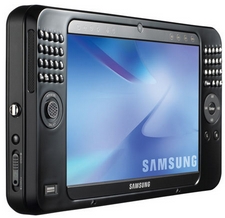 Samsung Q1 Ultra
Pre-installed with Microsoft Windows XP Tablet Edition, the Samsung come with its own QWERTY keyboard which is split into two, which is difficult at first but easily masters, although don’t ever think that you will touch type on it! The 7-inch touch screen is incredibly bright and clear, and easy to read. Powering the Samsung is an Intel A110 low-voltage processor. Memory is a decent 1024MB.
Also built into this Samsung are twin cameras, one at the front and the other at the rear, so you can take 1.3 mega pixel photographs or use it for video conferencing. There is Bluetooth, Wi-fi, and an SD card reader.
Sony Vaio VGN-UX1XN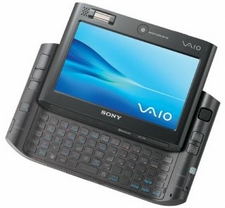
Pre-installed with Microsoft Vista the Sony weighs in at an incredible 480g! The 4.5-inch touch screen display shows off incredible detail, and the zoom controls allow you to zoom in and out where necessary. Hidden away is a full QWERTY keyboard that slides out from under the touch screen. Powering the Sony is an Intel Core Solo U1500 (1.33GHZ) processor, that runs at an ultra-low voltage. The Sony comes with 1024MB of memory and a Solid State Disk (SSD) with 32GB of Flash memory on-board, with means there are no moving parts in this device, allowing battery life to be more efficient.
Also built into this Sony is a 1.3 mega pixel camera, which can be used as a still or movie camera, or simply a web cam. There is Bluetooth, Wi-fi and a MemoryStick Pro slot, and a fingerprint scanner to help keep things secure.
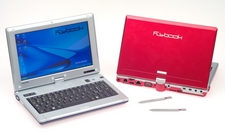 Flybook V33i
On a separate note, Tablet PC’s are becoming smaller and more lightweight, and one that we have recently purchased to play with is the Flybook V33i, with 3.5G mobile connection. With a price of around £1,000 its more expensive than UMPC’s, but it really does depend on what you’re after at the end of the day.
The Flybook, which is A5 in size, comes with an 8.9-inch 16:9 high resolution touch screen LCD, 1024MB memory, 40GB hard drive and is powered by an Intel Pentium Mobility (1.1GHZ) processor. This is a really slick and stylish Tablet, and comes in various colours too!