Move Administer Version 959 Released
 Move Administer version 0.0.0.959 is officially released today.
History of Changes (946 to 959)
ADDITION: A new field has been added to the SurveyAdminister table (SurveyAdminister table changed)
ADDITION: ‘Exchanged contracts’ is now exported too and imported from Survey Administer
ADDITION: Enquiry Sheets now print the ‘Exchanged contracts’ checkbox
ADDITION: Survey Sheets now print the ‘Exchanged contracts’ checkbox
FIX: Emailing International and European consignment documentation immediately after being linked now prints all information necessary
FIX: The ‘Add All’ button no longer adds deleted users to the recipient list on follow-ups
ADDITION: New fields added to SystemDefaults table (SystemDefaults table changed)
ADDITION: A new ‘Follow-Ups’ tab has been added to the System Defaults Wizard, allowing you many configuration options of follow-ups and automatically created follow-ups from quotations
ADDITION: A new ‘Create a follow-up’ checkbox has been added to all Quotation Wizards, that when checked will automatically create a follow-up based on the settings in the system defaults
ADDITION: A new icon has been added to all Follow-Up Forms that when pressed updates all recipients with the current reminder date and time
ADDITION: You are now warned if you create a follow-up with a reminder date and time but you have not added any recipients
ADDITION: Follow-Up browses now automatically refresh every ‘x’ seconds, but only if the window is active
FIX: The follow-up Reminder browse no longer shows future reminders
ADDITION: The My Follow-Ups browse now longer shows future follow-up reminders, however there is now a checkbox that when checked will override this
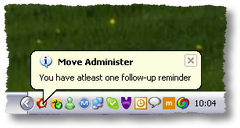
ADDITION: Move Administer now checks for follow-up reminders every ‘x’ seconds. A new icon now displays in the taskbar, the Move Administer icon meaning no reminders exist and a clock icon meaning at least one reminder exists. If a reminder is found then a balloon tooltip will be displayed above the taskbar icon. Double clicking this icon will automatically load your follow-up Reminders browse
ADDITION: You can now map a warehouse bay from the Warehouse Bay browse, from the Actions menu or Toolbar (Tools -> Options -> Storage -> Bays)
ADDITION: You can now map the warehouse bay of the highlighted container from the Container tab of the Storage Wizard, from the Actions menu
ADDITION: You can now map the warehouse bay of the highlighted container from the Query Containers browse and Query Occupied Containers browse, from the Actions menu and Toolbar

Follow-Ups
 In release 946 of Move Administer we stated that follow-ups was work in progress. Well I’m pleased to announce that follow-ups is now complete, bar further enhancements that our users may request.
You can now create follow-ups for any circumstance, and apply the follow-up reminder to any member(s) of staff.
Move Administer checks for follow-up reminders on a regular basis for the current user, and should a reminder be found then a notification balloon is display on the taskbar above the Move Administer icon.
At any time you can view your own follow-up reminders, follow-ups for you and follow-ups by you, where you can check to see which recipients have actioned your follow-up(s).
But we have automated the creation of follow-up reminders when creating and opening, if required, quotations. Options within Move Administer can automatically create the reminder for the creator of the quotation, the surveyor of the quotation and/or the current user, at a set time for a set number of days in advance! And if you do not work Saturdays and/or Sundays then these will automatically be skipped!
I’m sure this enhancement will go down well with all users as following up quotations is so necessary in such a competitive marketplace.
Warehouse Bay Mapping
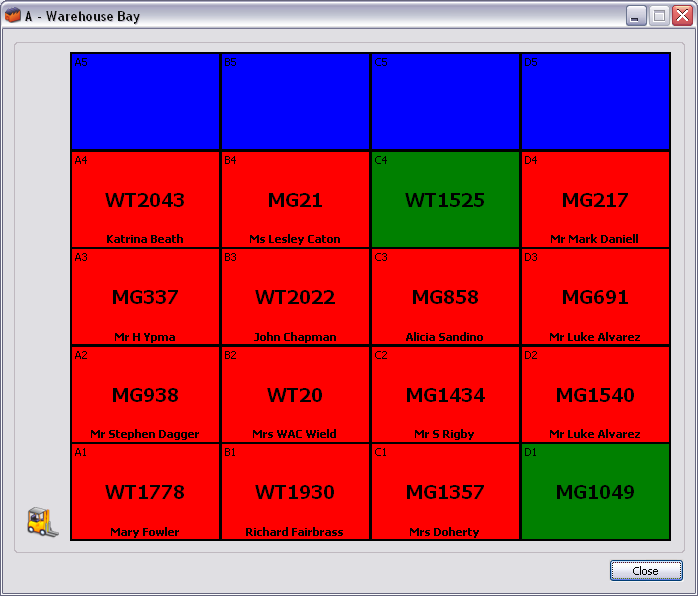 Right from the outset one feature we wanted to include in Move Administer was the ability to store the locations of each container within your warehouse, but now we’ve taken this one step further. Not only can you see at any time the location of a container, but at the press of a button you can now map the bay that the container is within.
As the example screen shows, we display the location of the container within the bay, the container number and the name of the occupant. Colour coding shows that blue containers are locations that are unused, green are empty containers and red are occupied containers.
Our vision from here is to someday release our Warehouse Administer where your Warehouse Manager can move containers around the screen, possibly by using a Tablet PC. So keep checking back for more information.